Write a NeXus HDF5 file with plottable data
Building on the previous example, we wish to identify our measured data with
the detector on the instrument where it was generated.
In this hypothetical case, since the detector was positioned at some
angle two_theta, we choose to store both datasets,
two_theta and counts, in a content group.
One appropriate NeXus class is NXdetector.
This group is placed in a NXinstrument group
which is placed in a NXentry group.
To support a default plot, we provide a NXdata group.
Rather than duplicate the same data already placed in the detector group,
we choose to make content links to those datasets in the NXdata group.
(Compare the next figure with Content links in a NeXus file in the
NeXus Design chapter of the NeXus User Manual.)
The NeXus Design chapter provides a figure
(Content links in a NeXus file) with a small variation from our
previous example, placing the measured data
within the /entry/instrument/detector group.
Content links to that data are made in the /entry/data group.
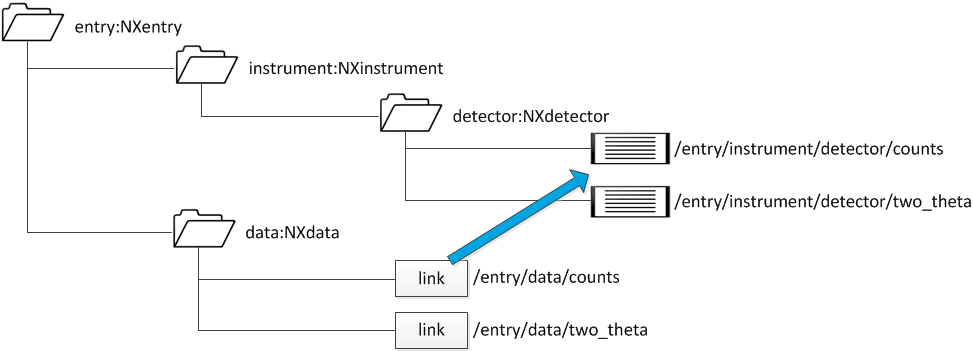
h5py example showing content links in a NeXus file
The Python code to build an HDF5 data file with that structure (using numerical data from the previous example) is shown below.
1#!/usr/bin/env python 2""" 3Writes a simple NeXus HDF5 file using nexusformat with content links 4according to the example from Figure 2.1 in the Design chapter 5""" 6 7from pathlib import Path 8 9import numpy 10from nexusformat.nexus import NXdata 11from nexusformat.nexus import NXdetector 12from nexusformat.nexus import NXentry 13from nexusformat.nexus import NXfield 14from nexusformat.nexus import NXinstrument 15from nexusformat.nexus import NXlink 16from nexusformat.nexus import nxopen 17 18filename = str(Path(__file__).absolute().parent.parent / "simple_example.dat") 19buffer = numpy.loadtxt(filename).T 20tthData = buffer[0] # float[] 21countsData = numpy.asarray(buffer[1], "int32") # int[] 22 23with nxopen("simple_example_write2.hdf5", "w") as f: # create the HDF5 NeXus file 24 f["entry"] = NXentry() 25 f["entry/instrument"] = NXinstrument() 26 f["entry/instrument/detector"] = NXdetector() 27 28 # store the data in the NXdetector group 29 f["entry/instrument/detector/two_theta"] = NXfield(tthData, units="degrees") 30 f["entry/instrument/detector/counts"] = NXfield(countsData, units="counts") 31 32 f["entry/data"] = NXdata( 33 NXlink("/entry/instrument/detector/counts"), 34 NXlink("/entry/instrument/detector/two_theta"), 35 ) 36 f["entry/data"].set_default()1#!/usr/bin/env python 2""" 3Writes a simple NeXus HDF5 file using h5py with content links 4according to the example from Figure 2.1 in the Design chapter 5""" 6 7from pathlib import Path 8 9import h5py 10import numpy 11 12filename = str(Path(__file__).absolute().parent.parent / "simple_example.dat") 13buffer = numpy.loadtxt(filename).T 14tthData = buffer[0] # float[] 15countsData = numpy.asarray(buffer[1], "int32") # int[] 16 17with h5py.File("simple_example_write2.hdf5", "w") as f: # create the HDF5 NeXus file 18 f.attrs["default"] = "entry" 19 20 nxentry = f.create_group("entry") 21 nxentry.attrs["NX_class"] = "NXentry" 22 nxentry.attrs["default"] = "data" 23 24 nxinstrument = nxentry.create_group("instrument") 25 nxinstrument.attrs["NX_class"] = "NXinstrument" 26 27 nxdetector = nxinstrument.create_group("detector") 28 nxdetector.attrs["NX_class"] = "NXdetector" 29 30 # store the data in the NXdetector group 31 ds_tth = nxdetector.create_dataset("two_theta", data=tthData) 32 ds_tth.attrs["units"] = "degrees" 33 ds_counts = nxdetector.create_dataset("counts", data=countsData) 34 ds_counts.attrs["units"] = "counts" 35 36 # create the NXdata group to define the default plot 37 nxdata = nxentry.create_group("data") 38 nxdata.attrs["NX_class"] = "NXdata" 39 nxdata.attrs["signal"] = "counts" 40 nxdata.attrs["axes"] = "two_theta" 41 nxdata.attrs["two_theta_indices"] = [ 42 0, 43 ] 44 45 source_addr = "/entry/instrument/detector/two_theta" # existing data 46 target_addr = "two_theta" # new location 47 ds_tth.attrs["target"] = source_addr # path of the target 48 nxdata[target_addr] = f[source_addr] # HDF5 hard link 49 50 source_addr = "/entry/instrument/detector/counts" # existing data 51 target_addr = "counts" # new location 52 ds_counts.attrs["target"] = source_addr # path of the target 53 nxdata[target_addr] = f[source_addr] # HDF5 hard link
It is interesting to compare the output of the h5dump
of the data file simple_example_write2.hdf5 with our Python instructions.
See the downloads section below.
Look carefully! It appears in the output of
h5dump that the actual data for two_theta
and counts has moved into
the NXdata group at HDF5 path /entry/data! But we stored
that data in the NXdetector group at /entry/instrument/detector.
This is normal for h5dump output.
A bit of explanation is necessary at this point.
The data is not stored in either HDF5 group directly. Instead, HDF5
creates a DATA storage element in the file and posts a reference
to that DATA storage element as needed.
An HDF5 hard link
requests another reference to that same DATA storage element.
The h5dump tool describes in full that DATA storage element
the first time (alphabetically) it is called. In our case, that is within the
NXdata group. The next time it is called, within the
NXdetector group, h5dump reports that an HDF5 hard link
has been made and shows the HDF5 path to the description.
HDF5 makes no distinction between the two paths of a hard-linked object.
NeXus does: the target content attribute holds the path of the target, so
NXdata/two_theta is a content link to its target in
the NXdetector group.
The punx tree tool knows about the target attribute and
shows the data at its target, in the NXdetector group.
 1  @default = "entry"
 2  entry:NXentry
 3    @NX_class = "NXentry"
 4    @default = "data"
 5    data:NXdata
 6      @NX_class = "NXdata"
 7      @axes = "two_theta"
 8      @signal = "counts"
 9      @two_theta_indices = [0]
10      counts --> /entry/instrument/detector/counts
11      two_theta --> /entry/instrument/detector/two_theta
12    instrument:NXinstrument
13      @NX_class = "NXinstrument"
14      detector:NXdetector
15        @NX_class = "NXdetector"
16        counts:NX_INT32[31] = [1037, 1318, 1704, '...', 1321]
17          @target = "/entry/instrument/detector/counts"
18          @units = "counts"
19        two_theta:NX_FLOAT64[31] = [17.92608, 17.92591, 17.92575, '...', 17.92108]
20          @target = "/entry/instrument/detector/two_theta"
21          @units = "degrees"
downloads
The Python code and files related to this section may be downloaded from the following table.
file |
description |
|---|---|
2-column ASCII data used in this section |
|
h5py code to write example simple_example_write2 |
|
nexusformat code to write example simple_example_write2 |
|
NeXus file written by this code |
|
h5dump analysis of the NeXus file |
|
punx tree analysis of the NeXus file |