This chapter actually defines the rules to use for writing valid NeXus files. An explanation of NeXus objects
is followed by the definition of NeXus coordinate systems, the rules for structuring files and the rules for
storing single items of data.
The structure of NeXus files is extremely flexible, allowing the storage both of
simple data sets, such as a single data array and its axes, and also of highly complex
data, such as the simulation results or an entire multi-component instrument. This flexibility
is a necessity as NeXus strives to capture data from a wild variety of applications in X-ray, muSR and
neutron scattering. The flexibility is achieved through a hierarchical
structure, with related content fields collected together into content groups,
making NeXus files easy to navigate, even without any
documentation. NeXus files are self-describing, and should be easy to understand, at
least by those familiar with the experimental technique.
The words group, field, attribute and link each have several
meanings. This manual always says which one, at one of five levels. Each
level relates to the next by one verb: nxdl.xsddeclares the terms of
NXDL, which define NeXus items, which describe content, which a file
format stores. Each level defines or uses a vocabulary (the names and
values that may be written), a grammar (how they may be combined: inside
what, and how often) and semantics (what is written means).
XML Schema (XSD): the language that nxdl.xsd is written
in, with its own vocabulary, grammar and semantics (a W3C standard).
nxdl.xsddeclares the vocabulary and grammar of NXDL: the terms of
NXDL with element declarations (xs:element), their XML attributes with
attribute declarations (xs:attribute), and, with nxdlTypes.xsd,
which it includes, the values those XML attributes may take, such as the
data type NX_FLOAT. It declares no semantics: this manual gives the
semantics of NXDL, in prose. A model
group (xs:group, such as groupGroup) is a named set of element
declarations, and an xs:attributeGroup a named set of attribute
declarations. Neither is a term of NXDL. An attribute declaration does
not declare an NXDL attribute, and a model group is not an NXDL group.
XML itself only has elements and XML attributes; XSD is written in XML.
NXDL: the NXDL files (*.nxdl.xml), written in the NeXus Definition
Language. Its terms, such as NXDL definitions, NXDL groups, NXDL
fields, NXDL attributes and NXDL links, are written as
definition, group, field, attribute and link elements.
An NXDL definition defines a NeXus class. An NXDL group, field, attribute
or link defines a NeXus group, field, attribute or link of that class.
The XML attributes of an NXDL term, such as name or type, give
the properties of the NeXus item it defines. The NXDL files use the
vocabulary and grammar that nxdl.xsd declares.
NeXus: the NeXus classes (base classes and application definitions),
with what they inherit through extends. A NeXus item is a NeXus
group, field, attribute or link of a class: a name or name pattern, with
the properties of its kind, such as a type, units, dimensions or
occurrence. A NeXus item is named by its
class and name, such as the NeXus field data of NXdetector, or by a
class path, such as
/NXentry/NXinstrument/NXdetector/data. A NeXus item describes
content. A NeXus group has a type: the class of the content groups it
describes, such as NXdetector. The type is always a base class, never
an application definition. A NeXus field or attribute has a data
type, such as NX_INT. The XML attribute type of the NXDL term
gives both. A NeXus attribute is an attribute of a NeXus group or field,
or one defined in an NXDL fieldAttributes: that one is a NeXus
attribute that any field directly in the class may have, whether or not
the class defines that field. The classes define the vocabulary of
content (the names of the classes and of their NeXus items, and enumerated
values), its grammar (which content groups, fields, attributes and links a
content group of a class may or must have, how often, with which data type
and dimensions) and its semantics (the documentation of each class and
NeXus item).
Content: the full content of a NeXus file, values and names included,
without anything specific to a file format. It consists of content
groups, content fields and content attributes, named by paths such as
/entry/instrument/detector/data; together they form the content
tree. A content field or group can be a content link. The NeXus field
data of NXdetector describes the content field data of every
content group of class NXdetector.
The content attribute @NX_class of a content group gives the type of
the NeXus group that describes it. Content uses the vocabulary, grammar
and semantics that the classes define, and may contain more than they
define.
Storage: how a file format, such as HDF5 or Zarr, stores the
content: storage groups, storage fields, storage attributes and
storage links, such as HDF5 groups, datasets, attributes and hard links.
Each file format has its own vocabulary, grammar and semantics; the
File Format chapter states how content is stored in
it.
For example, in <attributename="units"type="NX_CHAR"/> the
NXDL attribute defines the NeXus attribute @units of a NeXus field. That
NeXus attribute describes the content attribute @units of content fields. name and
type are XML attributes of that NXDL attribute. @ marks an attribute at
both levels: a NeXus attribute in a class path, such as
/NXdata/DATA@long_name, and a content attribute, such as
@units="eV".
XML Schema (nxdl.xsd)
NXDL (*.nxdl.xml)
NeXus (classes)
Content (any file format)
Storage (per file format)
declaration of the NXDL group
<xs:elementname="group"/>
NXDL group
<grouptype="NXdetector"/>
NeXus group
/NXentry/NXinstrument/NXdetector
content group
/entry/instrument/detector
storage group: HDF5 group; Zarr group
/entry/instrument/detector
declaration of the NXDL field
<xs:elementname="field"/>
NXDL field
<fieldname="data"/>
NeXus field
/NXentry/NXdata/data
content field
/entry/data/data
storage field: HDF5 dataset; Zarr array
/entry/data/data
declaration of the NXDL attribute
<xs:elementname="attribute"/>
NXDL attribute
<attributename="units"/>
NeXus attribute
/NXentry/NXdata/data@units
content attribute
/entry/data/data@units="eV"
storage attribute: HDF5 attribute; Zarr attribute
/entry/data/data:units="eV"
declaration of the NXDL link
<xs:elementname="link"/>
NXDL link
<linkname="data"target="…"/>
NeXus link
/NXentry/NXdata/data, linked to …/NXdetector/data
content link
/entry/data/data, which has @target
storage link: HDF5 hard, soft or external link; Zarr: none
/entry/data/data
declaration of the XML attribute name
<xs:attributename="name"/>
XML attribute name of an NXDL field
<fieldname="data"/>
name of a NeXus field
/NXentry/NXdata/data
name of the content field
/entry/data/data
storage name: HDF5 link name; Zarr node name
/entry/data/data
declaration of the XML attribute type
<xs:attributename="type"/>
XML attribute type of an NXDL field
<fieldtype="NX_INT"/>
data type of a NeXus field
NX_INT
data type of the content field
integervalues
storage data type: HDF5 datatype; Zarr data type
int32
Element and XML attribute are XML terms, as in
<elementattribute="value"/>. In <fieldname="data"type="NX_INT"/>,
field is the name of the element, and name and type are its XML
attributes. This manual calls this element an NXDL field.
nxdl.xsd is an XML file too, so it also has elements and XML attributes.
In <xs:attributename="type"/>, name is an XML attribute of the
xs:attribute element. Together they declare the XML attribute type,
which NXDL fields and attributes may have. To be clear, this manual names
what an XML attribute belongs to.
Note
Notation used to describe a NeXus data file
In various places in the NeXus manual, contents of a NeXus
data file are described using a tree structure, such as
in the Introduction.
The tree syntax is a very condensed version (with high information density) meant to convey the structure of the HDF file.
Content groups have a / appended to their name (with NeXus class name shown).
Indentation shows membership in the lesser indented parent above.
Content fields have a data type and value appended (for arrays, this may be an abbreviated view).
Content attributes (of content groups or fields) are prefixed with @.
Content links are described with some sort of arrow notation such as -->.
NeXus files consist of content groups,
which contain content fields and/or other
content groups to form a hierarchical structure.
This hierarchy is designed to make it
easy to navigate a NeXus file by storing related content fields together. Content
groups are identified both by a name, which must be unique within a particular
content group, and a class. There can be multiple content groups with the same class
but they must have different names (based on the HDF rules).
For the class names the prefix NX is reserved. Thus all NeXus class
names start with NX. The class of a content group is given by its content attribute
@NX_class: the type of the NeXus group that describes it.
Every content group in a NeXus file, the root included, must have the content
attribute @NX_class, whether or not a NeXus group describes it.
This file rule comes on top of the classes, which define the NeXus attribute
NX_class as required (see NXobject;
for the root group, NXroot).
Content fields (in older texts also called data fields, data items or data sets)
contain the essential information stored in a NeXus file. They can
be scalar values or multidimensional arrays of a variety of sizes (1-byte,
2-byte, 4-byte, 8-byte) and types (integers, floats, characters). They may
store both experimental results (counts, detector angles, etc.), and other
information associated with the experiment (start and end times, user names,
etc.). Content fields are identified by their names, which must be unique within the
content group in which they are stored. A content field described by a NeXus field with a units category
(such as units="NX_LENGTH") must have the content attribute @units.
In some cases, such as /NXdata/DATA, a NeXus field is
expected to be an array of several dimensions.
Examples of NeXus fields
variable (NX_NUMBER)
Dimension scale defining an axis of the data.
variable_errors (NX_NUMBER)
Errors (uncertainties) associated with axis variable.
wavelength (NX_FLOAT)
wavelength of radiation, units="NX_FLOAT".
chemical_formula (NX_CHAR)
The chemical formula specified using CIF conventions.
In the case of streaming data acquisition, when time-stamped values of data are collected, any NeXus field can be replaced by a NeXus group of type NXlog with
the same name. For example, if time stamped data for wavelength is being streamed, wavelength would not be an array but a NXlog structure.
Content attributes are extra (meta-)information that are associated with particular
content groups or fields. They are used to annotate data, e.g. with physical
units or calibration offsets, and may be scalar numbers or character
strings. In addition, NeXus uses them to identify
plottable data
and their axes, etc. In a tree structure,
a content attribute is usually shown with a @ prefix, such as @units.
NXobject defines the NeXus attributes that any group or field may have
(for fields, in its fieldAttributes); NXroot defines those of the
root group.
A description of some of the many possible
NeXus attributes can be found in the next table:
Examples of NeXus attributes
units (NX_CHAR)
Data units given as character strings,
must conform to the NeXus units standard. See the
NeXus Data Units section for details.
signal (NX_CHAR)
Defines which data set contains the signal
to be plotted.
Use signal="{dataset_name}" where {dataset_name}
is the name of a content field (which may be a content link) in the NXdata group.
The content field referred to by the content attribute signal
might be referred to as the “signal data”.
long_name (NX_CHAR)
Defines title of signal data or axis label of dimension scale
calibration_status (NX_CHAR)
Defines status of data value - set to Nominal or Measured
data_offset (NX_INT)
Rank values of offsets to use for each
dimension
if the data is not in C storage order
interpretation (NX_CHAR)
Describes how to display the data.
rgba, hsla and cmyk are (n x m x 4) arrays, where the
4 channels are the colour channels appropriately. If the image data
does not contain an alpha channel, then the array should simply be
(n x m x 3).
Allowed values include:
A content link states that a content field or group in one place of the hierarchy has
the same shared content as a content field or group in another place.
The NeXus definition sometimes requires the same data in different content groups.
For example: detector data belongs in the
NXinstrument/NXdetector group
but is also needed in NXdata for automatic plotting.
A content link expresses that both are the same data.
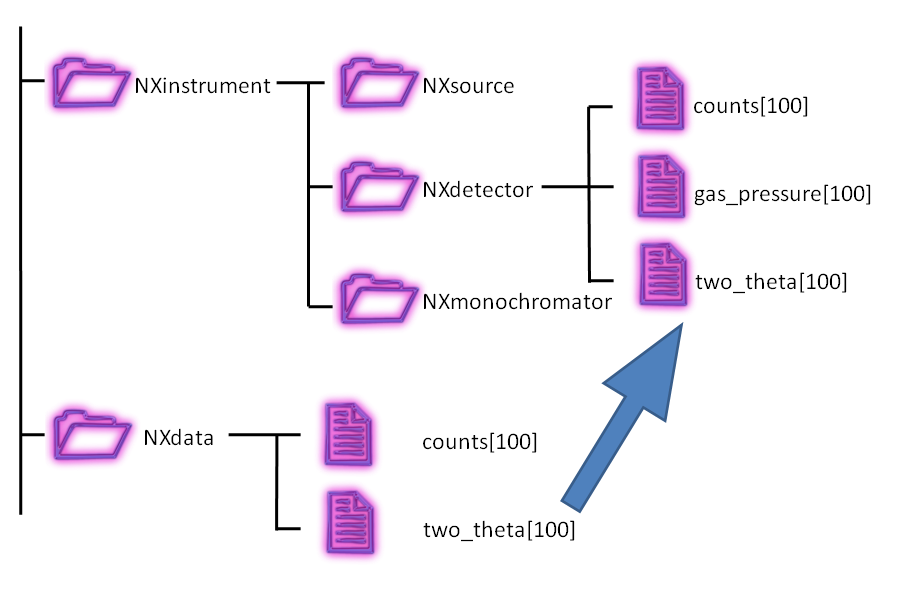
See the figure for
a more descriptive representation of the concept of content links.
What a content link is is part of the content and does not depend
on the file format; how it is stored is up to the file format and the
software that writes the file (see Storing content links in a file format).
an NXDL link: a link element in an NXDL file, which defines a
NeXus link;
a NeXus link: a NeXus item that names another NeXus field or group,
its target. It describes a content field or group with the same shared
content as one that its target describes; one of the two is a content link
to the other, or both are content links to the same target
(see Links of a class);
a content link: a content field or group whose content attribute
target is the path of another one, its target, with the same shared
content (see What a content link is);
a storage link: a way of a file format to make a storage field or
group available at another location, such as an HDF5 hard, soft or
external link
(see Storing content links in a file format).
A path is the absolute location of a content field or group in the content tree: the
names of the content groups from the root down to it, separated by /, such as
/entry/instrument/detector/polar_angle.
The shared content of a content field is its values, data type and content
attributes, except target. The shared content of a content group is its content
attributes, except target, and the shared content of its content fields and
groups, under their names. The name of the content field or group itself is not
part of its shared content.
A content link is a content field or group whose content attribute target
(see NXobject) is the path of another one, its target, and that has the
same shared content as its target:
the value is an absolute path
(/entry/instrument/detector/polar_angle, not detector/polar_angle);
the target is not a content link itself;
the target itself does not need a content attribute target; when it has one, for
example because it is stored as the same object as the content link, the
value is its own path;
a content field or group without a content attribute target, or whose
target is its own path, is not a content link.
Content links are best understood with an example.
The canonical class path of the NeXus field wavelength
(see Strategies: The wavelength) has been:
/NXentry/NXinstrument/NXcrystal/wavelength
An alternative location for this NeXus field makes sense to many,
especially those not using a crystal to create monochromatic radiation:
/NXentry/NXinstrument/NXmonochromator/wavelength
In a file, the second can be a content link to the first:
A content link may have a different name than its target. One obvious use of
this capability is to adapt to a specific requirement of an application
definition. For example, suppose some application definition required the
specification of wavelength as a NeXus field lambda of NXentry.
This requirement can be satisfied easily:
Here /entry/instrument/monochromator/wavelength and /entry/lambda
are content links to their target /entry/instrument/crystal/wavelength:
all three have the value 154 and the same content attribute units, and both
content links have @target="/entry/instrument/crystal/wavelength".
Which content field or group is the target is part of the content, through @target,
but not of the shared content. It has value in
only a few situations, such as when converting the data from one format to
another: by identifying the target, duplicate copies of the data are not
converted.
Where the content is stored, in one file, in several files or in an object
store, is not part of the content: the value of @target is always a path in the
content tree (see Storing content links in a file format).
Any content field or group may be a content link, whether or not a NeXus link
describes it. An application definition may also require one: an NXDL link
defines a NeXus link, which the documentation of the class
shows as, for example:
A file satisfies this when the content group that the enclosing NeXus group describes
contains a content field or group named data with the same shared content as one
that its target, the NeXus field /NXentry/NXinstrument/NXdetector/data, describes,
and one of the two is a content link to the other, or both are content links to
the same target. Either may be the content link. A
NeXus link states nothing else: type, units and dimensions are those of its target.
The XML attribute target of an NXDL link is a class path, written
with class names such as NXdetector: it names a NeXus field or group,
not a path in a file. The value of @target does not have to match it.
This XML attribute of the NXDL link is not the content attribute
@target of a content field or group in a data file. The NeXus field or group it
names describes content fields and groups in the file, such as the content field data
of a content group of class NXdetector in the content group of class NXinstrument
of the entry. First of all, it says which content field or group must have
the same shared content as the one the NeXus link describes; @target only
has to join the two, as above.
NeXus only requires that a content link has the shared content of its target. A
file format and the software that writes the file may realize this in any
way the format offers: with a storage link, which makes the stored content
available under another path, or by storing a copy.
Every format that can hold NeXus content can therefore hold content links,
at least as copies. For example, the
Zarr v3 specification
defines no storage links: every Zarr array or group exists under exactly one
path, so a content link is stored as a copy with the Zarr attribute target.
HDF5 offers several ways to store a content link: HDF5 links, virtual
datasets and copies. In each case, the software
that writes the file must add the HDF5 attribute target.
An HDF5 hard link [1] makes the same HDF5 object available
under several paths; it is the usual choice. An HDF5 soft link is a path
that refers to another path, so it also shows the same object. In both
cases the content link and its target are one object with one set of
HDF5 attributes: the
HDF5 attribute target is set once, on that object, with the path of the
target as value.
HDF5 makes no distinction between the paths of a hard-linked object: the
HDF5 attribute target is what tells NeXus which one is the content link (see the
Frequently Asked Questions question: I’m using content links to place data in two places.
Which one should be the data and which one is the content link?).
To store a content link as an HDF5 hard link:
Get the HDF5 object (dataset or group) to be linked.
If it has no HDF5 attribute target, add one with its absolute path as value.
Create an HDF5 hard link to the object at the new path.
A virtual dataset or a copy is an object of its own, with its own
HDF5 attributes. Add the HDF5 attribute target to it, with the path of the
target as value. The target itself needs no HDF5 attribute target.
The same holds for an HDF5 dataset with external binary data
(Dataset.external in h5py), whose values are stored in a binary file
outside the HDF5 file. When it reads the same bytes of the same binary file
as the target, it has the same values.
A content field or group may also have its content stored in another file.
Consider the case where an instrument uses a detector with
a closed-system software support provided by a commercial vendor.
This system writes its images into a NeXus HDF5 file.
The instrument’s data acquisition system writes instrument metadata
into another NeXus HDF5 file. In this case, the instrument metadata file
might refer to the data in the detector image file.
Here is an example (from Diamond Light Source)
showing an HDF5 external link:
Example of an HDF5 external link to data in another file
HDF5 does not allow hard links to objects in another file: h5py raises
Interfile hard links are not allowed. In
Links to Data in External HDF5 Files,
a master file therefore makes an HDF5 external link at each place where data
from another file is represented. These places are not content links: none
of them has an HDF5 attribute target.
Unlike a virtual dataset, an HDF5 external link has no HDF5 attributes of its
own: the ones it shows are those of the object in the other file. In
the three examples below, master.h5 has the target
/entry/instrument/detector/data and the content link /entry/data/data,
and the detector writes its images to /entry/data/data in
detector.h5.
Example 1: a content link stored as an HDF5 external link. Both paths in
master.h5 are HDF5 external links to the same object, as with an HDF5
hard link within one file:
The HDF5 attribute target is stored in detector.h5, with a
path in master.h5 as value, not the path of the object in
detector.h5. Read on its own, detector.h5 then has an HDF5
attribute target that refers to a path in another file, and only one linking
file can set it. detector.h5 must also be writable, which it often
is not.
Example 2: the target stored as an HDF5 external link, the content link
as an HDF5 soft link. An HDF5 soft link has no HDF5 attributes of its own
either: it shows the object in detector.h5, so the HDF5 attribute target
is stored there, with the same caveats as in example 1:
The HDF5 soft link may also point the other way: /entry/data/data the
HDF5 external link and /entry/instrument/detector/data an HDF5 soft link
to it. The HDF5 attribute target, not the direction of the storage link, says which path is the content link.
Example 3: the target stored as an HDF5 external link, the content link
as a virtual dataset. The target itself needs no HDF5 attribute target, so
detector.h5 is not changed. The content link is an object in
master.h5 that carries the HDF5 attribute target: a virtual dataset that
maps the data in detector.h5. HDF5 has no hard links between files:
This always works for a content field. An HDF5 group cannot be a virtual dataset; a content
link to a content group whose content is in another file is stored as a copy, or as
in example 1 or 2.
Content groups often represent objects in the experiment (monitors, detectors,
monochromators, etc.), so that their content fields and groups comprise the properties of that object. NeXus has defined a set of standard
objects, or base classes,
out of which a NeXus file can be constructed. Each content group
is identified by a name and a class. The group class defines the type of object
and the properties that it can contain, whereas the group name defines a unique instance
of that class. These classes are
defined in XML using the NeXus Definition Language
(NXDL) format. All NeXus class types adopted by the NIAC must
begin with NX.
Classes not adopted by the NIAC must not
start with NX.
Note
NeXus base classes are the components used to build the
NeXus data structure.
Not all classes define physical objects. Some refer to logical groupings of
experimental information, such as
plottable data,
sample environment logs, beam profiles, etc.
There can be multiple instances of each class. On
the other hand, a typical NeXus file will only contain a small subset of the
possible classes.
Note
All NeXus items of a base class are optional, with a few particular
exceptions in NXentry and NXdata, and the NeXus attribute NX_class,
which is required (see NXobject). Every content group, the root
included, must have the content attribute @NX_class (see
Content Groups). The NeXus items are listed to give the exact spelling
and use of each name in a file.
NeXus base classes are not proper classes in the same sense as used in object oriented programming
languages. In fact the use of the term classes is actually misleading but has established itself during the
development of NeXus. NeXus base classes are rather dictionaries of the names and meanings
of the NeXus fields of that class. This sounds complicated but
becomes easy if you consider that most base classes stand for instrument components. Then for example, a
NXmonochromator base class defines all the possible NeXus field names which NeXus allows to be used to describe a
monochromator.
Most NeXus base classes represent instrument components. Some are used as containers to structure information in a
file (NXentry, NXcollection, NXinstrument, NXprocess, NXparameters).
But there are some base classes which have special uses which need to be mentioned here:
NXlog is used to store time stamped data like the log of a temperature controller.
Basically you give a start time,
and arrays with a difference in seconds to the start time and the values read.
NXcollection is used to gather together any set of terms.
Anything (content groups, fields, or attributes) placed in
an NXcollection group will not be validated.
One use is to use this as a container class for the various
control system variables from a beamline or instrument.
This base class provides a place to store general notes, images, video or
whatever. A mime type is stored together with a binary blob of data.
Please use this only for auxiliary information, for example an image
of your sample, or a photo of your boss.
NXgeometry and its subgroups NXtranslation,
NXorientation, NXshape are used to store absolute positions in the
laboratory coordinate system or to define shapes.
Content groups of these classes can appear anywhere in the NeXus hierarchy, where needed. Preferably close to the component they
annotate or in a NXcollection. All of the base classes are documented in the reference manual.
Single inheritance is supported in NeXus for both base classes and application definitions (which are
described below). Extending a base class or application definition inherits the NeXus items of the
parent class or definition, its NeXus groups, fields, attributes and links, and its symbol tables. These NeXus items
of the parent can then be overridden by the subclass. Only single inheritance is allowed (you can only inherit
from a single parent).
Use the XML attribute extends of an NXDL definition to indicate which definition is being subclassed. Base classes
should extend from NXobject unless they are being subclassed.
The most notable special base class is NXdata.
NXdata is the answer to a basic motivation of NeXus to facilitate
automatic plotting of data.
NXdata is designed to contain the main dataset and its associated
dimension scales (axes) of a NeXus data file.
The usage scenario is that an automatic data plotting program just
opens a NXentry and then continues to search for any NXdata
groups. These NXdata groups represent the plottable data.
An algorithm for identifying the default plottable data
is presented in the
chapter titled Rules for Storing Data Items in NeXus Files.
There are many ways to store metadata about your experiments.
Already there are many NeXus fields in the various base classes
to store the more common or general metadata, such as wavelength.
(For wavelength, see the Strategies: The wavelength section.)
One common scheme is to store the metadata all in one
content group. If that content group is to be validated,
then there are several possibilities, as shown in the next table:
The objects described so far provide us with the means to store data from a wide variety of instruments,
simulations, or processed data as resulting from data analysis. But NeXus strives to express strict standards for
certain applications of NeXus, too. The tool which NeXus uses for the expression of such strict standards is the NeXus
Application Definition.
A NeXus Application Definition defines which NeXus groups and fields are required
in order to properly describe an application of NeXus. For example for describing a powder diffraction
experiment.
An application definition may also define optional NeXus items.
Typically an application definition will contain only a small subset of the many NeXus groups and fields
defined in NeXus. NeXus application definitions are also expressed in the NeXus Definition Language (NXDL). A tool exists
which allows one to validate a NeXus file against a given application definition.
Note
NeXus application definitions define the minimum required information
necessary to satisfy data analysis or other data processing.
Another way to look at a NeXus application definition is as a
contract between a file producer (writer) and a file consumer (reader).
The contract reads:
If you write your files following a particular NeXus application definition,
I can process these files with my software.
Yet another way to look at a NeXus application definition is to understand it as an interface definition
between data files and the software which uses this file. Much like an interface in the Java or other modern
object oriented programming languages.
Like base classes, NeXus supports Inheritance in NeXus in application definitions.
Please note that a NeXus Application Definition will only define the bare minimum of data necessary to perform
common analysis with data. Practical files will nearly always contain more data. One of the beauties of NeXus is
that it is always possible to add more data to a file without breaking its compliance with its application definition.
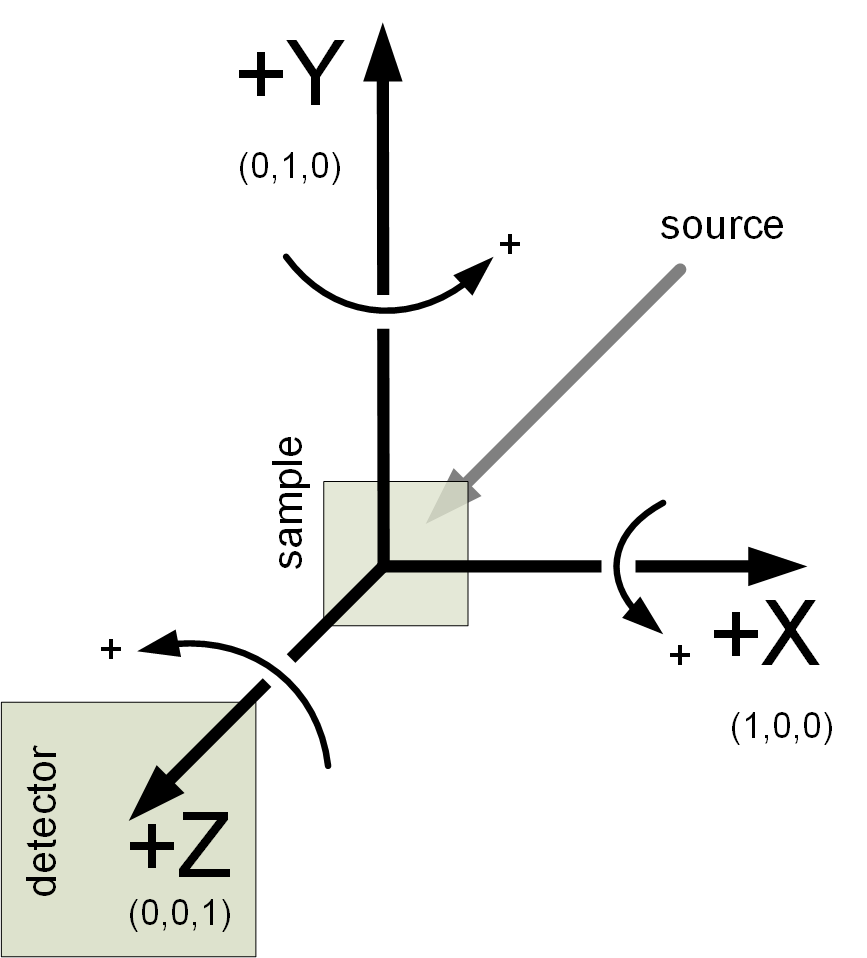
The NeXus coordinate system is shown below. Note that
it is the same as that used by McStas (http://mcstas.org). This choice is
arbitrary and any other choice should be possible as long as it is
used consistently and application code that reads NeXus files does not assume
any prior knowledge of the chosen coordinate system.
In the recommended way of dealing with geometry NeXus uses a series of
transformations to place objects in space.
In this world view, the absolute position of a component or a detector pixel with respect to
the laboratory coordinate system is calculated by applying a series of translations and
rotations. Thus a rotation or translation operation transforms the whole coordinate system
and gives rise to a new local coordinate system. These transformations between coordinate
systems are mathematical operations and can be expressed as matrices and their combination
as matrix multiplication. A very important aspect is that the order of application of the
individual operations does matter. The mathematics behind this is well known and used in
such applications such as industrial robot control, flight dynamics and
computer games. The beauty in this comes from the fact that the operations to apply map easily
to instrument settings and constants. It is also easy to analyze the contribution of each individual
operation: this can be studied under the condition that all other operations are at a zero setting.
In order to use coordinate transformations, several pieces of information need to be known:
Type
The type of operation: rotation or translation
Direction
The direction of the translation or the direction of the rotation axis
Value
The angle of rotation or the length of the translation
Order
The order of operations to apply to move a component into its place.
NeXus Field and Attributes of a Coordinate Transformation
NeXus chooses to encode information about each transformation as a NeXus field of NXtransformations
in the following way:
value
This is represented in the actual data of the content field or the value of the
transformation. Its actual name should relate to the physical device used to
effect the transformation.
The NeXus attributes of this field are:
transformation_type
This specifies the type of transformation and is either rotation
or translation and describes the kind of operation performed
vector (NX_NUMBER)
This is a set of 3 values forming a unit vector for direction that
describes the components of either the direction of the rotation axis or
the direction along which the translation happens.
offset (NX_NUMBER)
This is a set of 3 values forming the offset vector for a translation to apply
before applying the operation of the actual transformation. Without this
NeXus attribute, additional virtual translations would need to be introduced in order
to encode mechanical offsets in the axis.
depends_on
The order is encoded through this NeXus attribute. Its value is the name of the
transformation upon which the current transformation depends on.
As each transformation represents possible motion by a physical device, this
dependency expresses the attachment order; thus, the current device is attached
to (or mounted on) the next device referred to by this NeXus attribute.
Allowed values for depends_on are:
.
A dot ends the depends_on chain
name
The name of a content field within the enclosing content group
dir/name
The name of a content field further along the path
/dir/dir/name
An absolute path to a content field in another content group
In addition, for each beamline component, there is a depends_on attribute
that points to the content field at the head of the axis dependency chain. For example,
consider an eulerian cradle as used on a four-circle diffractometer.
Such a cradle has a dependency chain of phi:chi:rotation_angle. Then
the depends_on content field in NXsample would have the value phi.
NeXus Transformation encoding
Transformation encoding for an eulerian cradle on a four-circle diffractometer
The type and direction of the NeXus standard operations is documented below
in the table: Actions of standard NeXus fields.
The rule is to always give the content attributes to make perfectly clear how the axes work. The CIF scheme
also allows to store and use arbitrarily named axes in a NeXus file.
The CIF scheme (see NXtransformations) is the preferred method
for expressing geometry in NeXus.
The shape of instrument components can be described using the NXoff_geometry
class. NXoff_geometry is a polygon-based description, based on the open OFF format.
Conversion between OFF files and the NeXus description is straightforward. This is
beneficial as existing tools can use, view or manipulate the geometry in OFF files.
CAD software, for example FreeCAD, can be used to
define the geometry. 3D rendering tools such as Geomview
can be used to view the geometry. McStas can use OFF
files to define the shape of components for scattering simulations.
The example OFF file shown below defines a cube. The first line containing
numbers defines: the number of vertices, the number of faces (polygons) making
up the model’s surface, and the number of edges in the mesh. Note, the number of
edges must be present but does not need to be correct
(http://www.geomview.org/docs/html/OFF.html).
Following the initial line are the xyz coordinates of each vertex, followed
by the list of faces. Each line defining a face starts with the number of
vertices in that face followed by the sequence number of the composing vertices,
indexed from zero. The vertex indices form a winding order by defining the face
normal by the right-hand rule. The number of vertices in each face need not be
constant; a mesh can comprise of polygons of many different orders.
The list of vertices in an OFF file maps directly to the vertices dataset in
the NXoff_geometry class. The vertex indices of the face list in the OFF
file occupy the winding_order dataset of the NeXus class, however the list
is flattened to 1D in order to avoid a ragged-edged dataset, which are not
easy to work with using HDF libraries. A faces dataset contains the position
of the first entry in winding_order for each face. The NXoff_geometry
equivalent of the OFF cube example is shown below.
Although the polygon-based description of NXoff_geometry is very flexible,
it is not ideal for curved shapes when high precision is required since a very
large number of vertices may be necessary. A common example of this is when
describing helium tube, neutron detectors. NXcylindrical_geometry provides
a more concise method of defining shape for such cases.
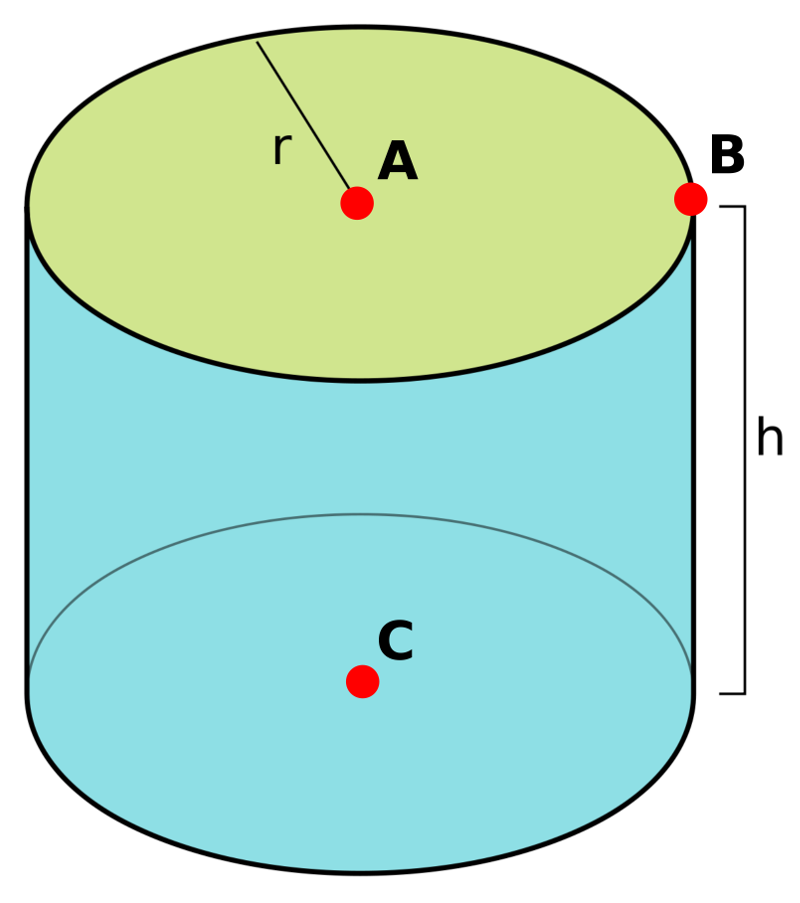
Like NXoff_geometry, NXcylindrical_geometry contains a vertices
dataset. The indices of three vertices (A, B, C in Cylinder definition with three vertices) in the vertices dataset are used to
define each cylinder in the cylinders dataset.
An NXoff_geometry or NXcylindrical_geometry group named detector_shape
can be placed in an NXdetector or NXdetector_module to define the complete
shape of the detector. Alternatively, the NeXus group pixel_shape
defines the shape of a single pixel. In this case, x_pixel_offset,
y_pixel_offset and z_pixel_offset datasets of the NXdetector define
how the pixel shape is tiled to form the geometry of the complete detector.
The above system of chained transformations is the recommended way of
encoding geometry going forward. This section describes the traditional way
this was handled in NeXus, which you may find occasionally in old files.
Coordinate systems
in NeXus have undergone significant development. Initially, only motor
positions of the relevant motors were stored without further standardization.
This soon proved to be
too little and the NeXus polar coordinate system
was
developed. This system still
is very close to angles that are meaningful to an instrument scientist
but allows to define general positions of
components easily. Then users from the simulation community
approached the NeXus team and asked for a means
to store absolute coordinates. This was implemented through
the use of the NXgeometry class on top of the
McStas system.
We soon learned that all the things we do can be expressed through the
McStas coordinate system. So it became the reference coordinate system
for NeXus. NXgeometry was expanded to allow the description of shapes
when the demand came up. Later, members of the
CIF team
convinced the NeXus team of the beauty of transformation matrices and
NeXus was enhanced to store the necessary information to fully map CIF
concepts. Not much had to be changed though as we
choose to document the existing angles in CIF terms. The CIF system
allows to store arbitrary operations and nevertheless calculate
absolute coordinates in the laboratory coordinate system. It also
allows to convert from local, for example detector
coordinate systems, to absolute coordinates in the laboratory system.
As stated above, NeXus uses the
McStas coordinate system (http://mcstas.org)
as its laboratory coordinate system.
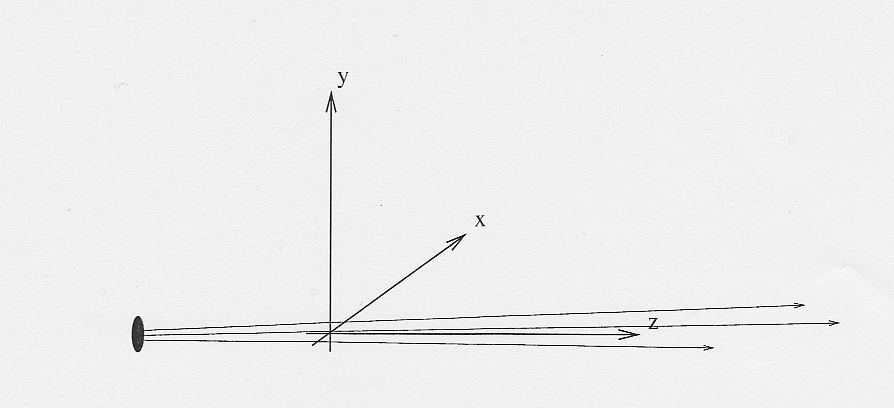
The instrument is given a global, absolute coordinate system where the
z axis points in the direction of the incident beam,
the x axis is perpendicular to the beam in the horizontal
plane pointing left as seen from the source, and the y axis
points upwards. See below for a drawing of the McStas coordinate system. The origin of this
coordinate system is the sample position or, if this is ambiguous, the center of the sample holder
with all angles and translations set to zero. The McStas coordinate system is
illustrated in the next figure:
The NeXus NXgeometry class directly uses the
McStas coordinate system.
NXgeometry classes can appear in any
component in order to specify its position.
The suggested name to use is geometry.
In NXgeometry the NXtranslation/values
NeXus field gives the absolute position of the component in the McStas coordinate system. The NXorientation/value NeXus field gives
the orientation of the component as a vector of in the McStas coordinate system.
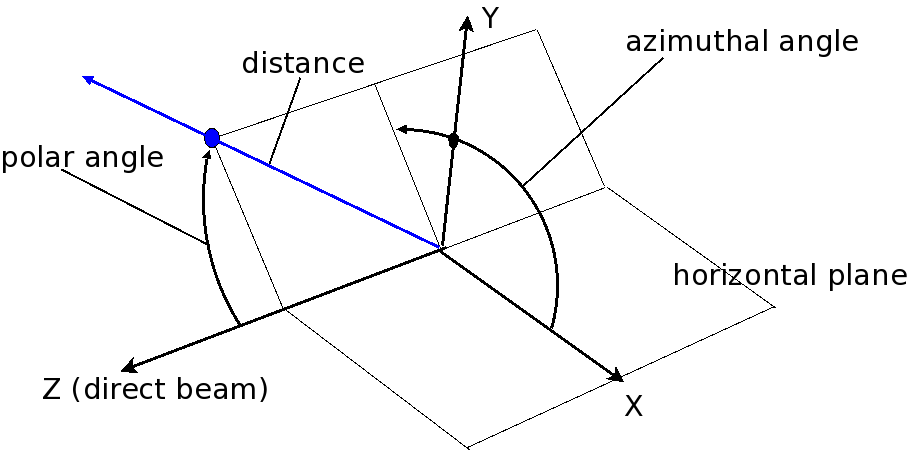
In this system,
the instrument is considered as a set of components through
which the incident beam passes. The variable distance is assigned to each component and represents the
effective beam flight path length between this component and the sample. A sign
convention is used where negative numbers represent components pre-sample and positive
numbers components post-sample. At each component there is local spherical coordinate system
with the angles polar_angle and azimuthal_angle.
The size of the sphere is the distance to the previous component.
In order to understand this spherical polar coordinate system it is helpful
to look initially at the common condition that azimuthal_angle
is zero. This corresponds to working directly in the horizontal scattering
plane of the instrument. In this case polar_angle maps
directly to the setting commonly known as two theta.
Now, there are instruments where components live outside of the scattering plane.
Most notably detectors. In order to describe such components we first apply
the tilt out of the horizontal scattering plane as the
azimuthal_angle. Then, in this tilted plane, we rotate
to the component. The beauty of this is that polar_angle
is always two theta. Which, in the case of a component
out of the horizontal scattering plane, is not identical to the value read
from the motor responsible for rotating the component. This situation is shown in
Polar Coordinate System.